

eCommerce Category Page SEO: 9 Tactics to Drive More Organic Traffic in 2026

Published: June 12, 2026
Share on LinkedIn Share on Twitter Share on Facebook Click to print Click to copy url
Summarize with ChatGPT
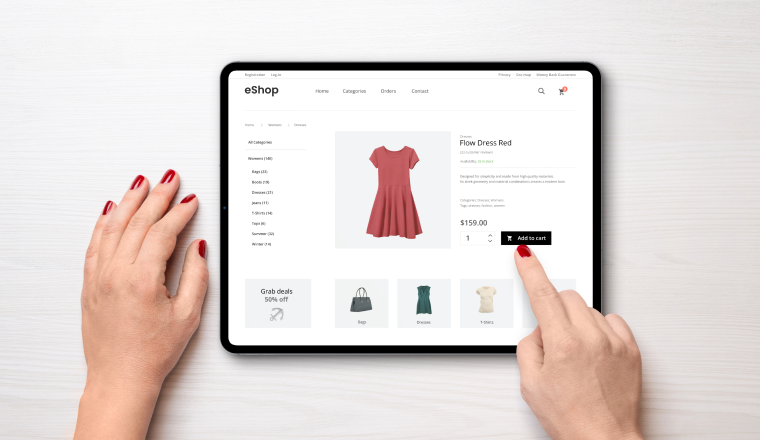
eCommerce category page SEO is probably the most overlooked strategy when it comes to search engine optimization for companies that sell products online.
Companies hyper-focus on their product pages or pouring resources into blog content, while their category pages are hardly given a second thought — no content, weak title tags, zero internal linking strategy.
As a result, many expensive and time-consuming SEO initiatives fail to reach their full potential.
With search continuing to evolve in 2026, category pages remain one of the most important levers for driving qualified organic traffic. The good news is that many of the highest-impact improvements are relatively straightforward to implement. If that sounds familiar, let’s talk about why category pages deserve to be your top SEO priority in 2026 and what you can actually do to fix them.
What Are Category Pages?
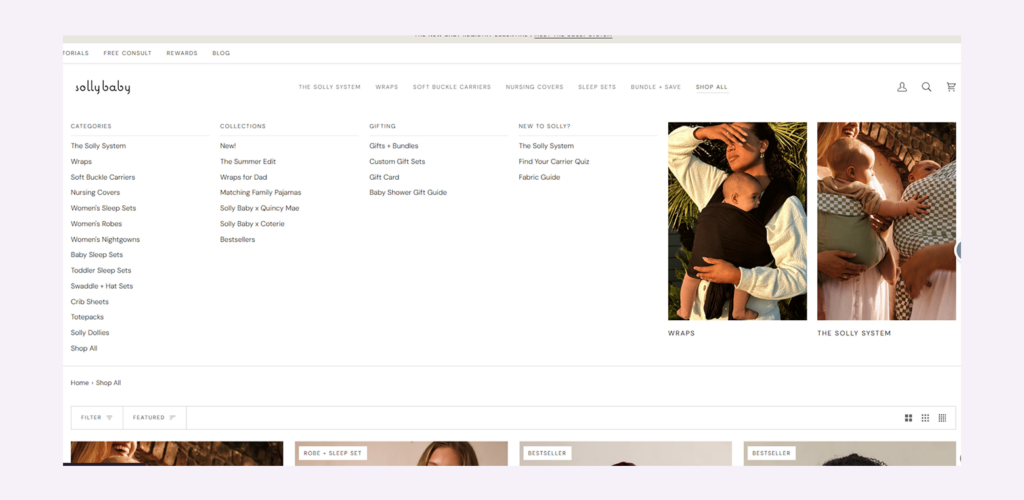
Category pages — often referred to as Product Listing Pages (PLPs) — are pages on an eCommerce website that organize products into specific categories. Using Solly Baby as an example, categories include collections such as Wraps, Soft Buckle Carriers, Nursing Covers, and Sleep Sets.
Within those broader categories, products may be further organized into more specific groupings. For example, a Sleep Sets category could contain separate collections for Women’s Sleep Sets, Baby Sleep Sets, and Toddler Sleep Sets. This structure helps customers navigate the catalog while also creating opportunities to target more specific search intent.
At the other end of the site hierarchy are product pages, often called Product Detail Pages (PDPs). These pages are dedicated to a single product, such as a specific Solly Wrap colorway or a particular Soft Buckle Carrier design.
To simplify:
- Category pages = a collection of related products
- Product pages = an individual product
This distinction is important because it reflects how most eCommerce websites are structured.
From an SEO perspective, category pages generally fall into two groups:
Category Listing Pages (CLPs) — Broader pages that primarily link to other categories rather than individual products. Using Solly Baby as an example, a “Shop All” page or a high-level collection hub that directs users to Wraps, Carriers, Nursing Covers, and other collections would function as a CLP.
Product Listing Pages (PLPs) — Pages that display products within a specific category. For example, the Wraps collection page would be considered a PLP because it contains individual products available for purchase.
Understanding which type of page you’re optimizing is important because it influences content strategy, internal linking, site architecture, and keyword targeting.
Why Category Pages Dominate eCommerce SEO
Understanding how to categorize your store’s products is essential for SEO because they typically have more traffic potential than any other page type on your site.
While homepages often generate the highest volume of traffic, much of that traffic is branded. Users searching for your company name are already familiar with your brand, making homepage traffic a less reliable indicator of SEO performance.
Blog content can generate significant traffic as well, but it often attracts users earlier in the buying journey. Someone searching for “how to choose running shoes” is typically less purchase-ready than someone searching for “men’s trail running shoes.”
This is where category pages stand apart.
Category pages target high-volume, transactional queries from users who already know what type of product they want and are actively evaluating options.
Despite this, many eCommerce SEO strategies focus heavily on blog content because of its traffic potential or product pages because of their conversion potential. Category pages often receive far less attention, even though they frequently represent the largest opportunity to drive qualified organic traffic and revenue.
For many eCommerce sites, category pages are the most valuable pages to optimize—and one of the most underutilized.
9 Ways to Improve Your eCommerce Category Pages for SEO
Before getting into tactics, a quick note on keyword research: every piece of category page optimization starts with knowing what your customers are actually searching for.
Not what you call your products internally, not what sounds logical to you — what people type into Google.
This tends to happen more often with B2B keywords where terminology may be out-of-fashion with newer generations of buyers or terms that get used at tradeshows and conventions don’t necessarily represent what typical customers use.
Before you optimize a single title tag or write a single word of category content, use a keyword research tool — Ahrefs, Google Search Console, or even Google’s autocomplete — to confirm you’re targeting the phrases people actually search. Then build everything below around those terms.
1. Optimize Title Tags — Including the Parts Most People Get Wrong
Title tags are one of the most important on-page SEO factors, and on category pages, they’re even more critical because the stakes are so much higher. A well-optimized title tag on a strong category page can be responsible for thousands of visits per month.
Here’s what actually matters:
Put Your Primary Keywords First
Don’t bury it after your brand name. If someone is searching “men’s trail running shoes,” your title tag should lead with that phrase, not with your company name. Again, your website shouldn’t have any problem ranking for its own branded terms, so those should never take top billing (aside from your homepage – maybe).
Consider Dropping Your Brand Name Entirely
If your category page only sells your own brand’s products, your brand name in the title tag is probably wasted characters.
Google is unlikely to rank a competitor over you for your own branded category, so you’re not winning anything by including it — and you’re losing space you could use for another keyword.
And if your category page isn’t dedicated to your brand’s own products, there’s even less point to adding your brand name.
Use those extra characters for other important keywords or terms that will help your clickthrough rate (i.e., “guaranteed”, “free shipping”, “two-day delivery”, etc.).
Test Modifiers
Speaking of your extra characters, check to see which modifiers seem to work best for your competitors.
Words like “Cheap,” “Shop,” and “Buy” can attract different search intents.
In the past, title tags that used words like “Best” and “Top” were exclusively the domain (no pun intended) of blog posts, but that’s not always the case anymore. Do your due diligence to see if certain modifiers may be the necessary ingredient for higher traffic.
And if you don’t see any of your competitors adding these kinds of modifiers to their category pages, get busy doing some tests. You could discover a competitive edge that unlocks your eCommerce site’s full SEO potential.
2. Go as Granular as Your Product Catalog Allows
One of the biggest traffic opportunities in eCommerce SEO is creating subcategory pages that target the specific, longer search queries your customers actually use.
Broad category pages such as “Women’s Clothing” often face intense competition from major retailers, marketplaces, and established fashion brands. More specific searches, however, are typically less competitive and often reflect stronger purchase intent. A query like “black flare jeans” or “high-waisted flare jeans” may attract less search volume, but it also creates an opportunity to compete for highly qualified traffic that larger competitors may not be targeting as directly.
The best way to uncover these opportunities is to look at how customers already navigate your inventory. Filters based on size, color, style, material, or other product attributes can often reveal subcategories that deserve dedicated landing pages. In the Willow Boutique example below, shoppers can filter products by attributes such as size and color.
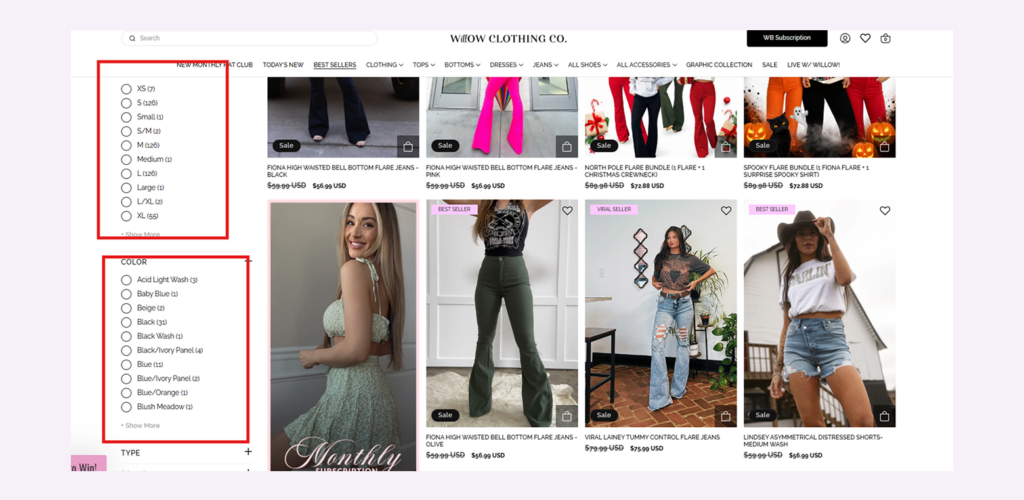
While not every filter should become an indexable page, these navigation options often mirror the same product attributes customers use when searching online. The key question is whether users are actively searching for that specific product grouping and whether there is enough demand to support a standalone page.
Many successful eCommerce brands take a highly granular approach to category architecture. Rather than relying solely on broad category pages, they create indexable subcategory pages around popular product types and attributes that align with real search behavior. In many cases, your existing site filters can serve as a roadmap for identifying these opportunities.
Another useful method is to review the queries that already generate impressions for your category pages but fail to earn clicks. If Google is showing a page for a specific search term, it has already established some level of relevance. For example, if a general jeans category consistently receives impressions for “black flare jeans” but attracts little traffic from that query, it may indicate that searchers would be better served by a dedicated category page optimized around that intent.
That’s a very easy opportunity to create a page and optimize it for a valuable long-tail keyword.
3. Add Content — But Know When to Stop
Even in 2026, I think on-page content still remains one of the biggest missed opportunities for eCommerce companies. Many websites don’t have any at all. They have a Title Tag, an H1, and a list of products, that’s it.
Unfortunately, that doesn’t give Google a lot to work with. No wonder so many eCommerce companies go years without seeing any traffic on these all-important pages.
Here’s what Google’s John Mueller actually said about category pages with no content:
“When the eCommerce category pages don’t have any other content at all, other than links to the products, it’s really hard for us to rank those pages.”
That being said, Mueller also warned about taking things too far by creating 1,000-word walls of text that get stuffed below the product grid on category pages across the web:
“Our algorithms sometimes get confused when they have a list of products on top and essentially a giant article on the bottom, when our algorithms have to figure out the intent of this page.”
So what’s the right amount?
A short introductory paragraph — 50 to 100 words — above the product grid is a good opportunity to work in any keywords that may help Google better understand the page.
I also recommend taking this opportunity to add any copy that might encourage a customer to continue shopping. This is another chance to let them know about your shipping policy, guarantees/warranties, or anything else you know your market values (i.e., “made in America”, “family-owned”, etc.).
However, I also recommend adding plenty of copy beneath the product grid, too. Keeping in mind Mueller’s warnings against going overboard, a text block at the very bottom of the page is a great place to include keyword-optimized content without interrupting the user experience.
Amongst other things, this is an easy place to include an FAQ that covers popular questions and can even link out to blogs – especially content hubs that could use the boost – that elaborate on the topic in more detail.
Again, the point is not to create a whole blog post down there. This is only going to confuse Google about the point of the page. Stick to relevant content.
If you want a shortcut to figuring out what these FAQs are – and other types of content that would work for a category page – we recently made our own proprietary SEO tool, Barracuda, open to the public. It can do a whole host of important SEO analysis tasks, including helping you optimize the content for your category pages.
4. Be Strategic About How Categories Link to Products
The main job of a category page is to connect customers to products. But how you do that linking has real SEO consequences.
Prioritize Your Most Popular Products
For large stores—say, 50,000+ SKUs—trying to surface every product through a category page dilutes the PageRank that category page could be passing to your best-performing products. Instead of linking to everything through endless pagination, feature your most popular and most searched products prominently on the main category page and use subcategories to organize the rest.
This isn’t just an SEO consideration. A well-organized category page also creates a better user experience. Most shoppers do not want to scroll through hundreds of products to find what they need when a curated selection can help them reach the right products faster. In many cases, improvements to usability and site organization benefit both SEO performance and conversions.
Point Product Links to Canonical URLs
I know this sounds obvious, but it’s a common issue (especially on Shopify sites): product links from category pages can point to URL variants rather than the canonical product page, splitting ranking signals.
Always double-check that your product grid links go to the right destination.
Link to the Last Page of the Series
If a category page contains a large inventory, search engines may not efficiently discover every paginated URL by following only the sequential pagination links at the bottom of the page. In many cases, pagination only exposes links to the next few pages in the series, requiring crawlers to move through multiple layers before reaching deeper pages.
This can create crawl inefficiencies on large category pages. For example, if a category contains 20 pages of products, Googlebot may need to navigate through numerous intermediate pages before discovering the final pages in the series.
One way to improve crawlability is to include a link from the first page directly to the last page in the paginated sequence. This allows search engines to access deeper pages more quickly and discover products throughout the series with fewer crawl steps.
This video demonstrates how REI uses this approach to improve the crawlability of large category pages.
Many large eCommerce retailers, including Home Depot and Best Buy, use similar pagination structures to help search engines discover inventory more efficiently.
It’s also important to avoid placing noindex tags across an entire paginated series. Doing so can prevent search engines from discovering products that exist on deeper pages and limit the visibility of those URLs.
5. Build an Internal Linking Strategy Around Category Pages
Internal linking is the most underrated tactic in all of eCommerce SEO, and category pages are where it pays off most. The concept is straightforward: every internal link to a page tells Google that page is relevant and authoritative for its topic. You have more control over internal links than you do over external backlinks, so use that control deliberately.
In general, there are two caveats:
- The page the internal link comes from needs to be relevant. Linking from a blog post about yoga to your category page for running shoes won’t help.
- The anchor text needs to be descriptive and should include a keyword you want the targeted page to rank for. “Click here” or “find out more” is wasting the opportunity. Instead, use anchor text like “supportive running shoes”, which does a better job of explaining the page to Google and will help it rank for that popular term.
Link From Blog Content to Product Pages
This is actually the main SEO reason I’d argue for maintaining an eCommerce blog. Not because blogs convert (they usually don’t), but because a well-ranked blog post can pass authority to the category pages that do – where conversions usually start.
Write posts that answer questions your customers ask:
- “How to Choose Trail Running Shoes”
- “Best Running Shoes for Flat Feet”
- “Trail vs. Road Running: What’s the Difference”
And link from each of those posts to your relevant category pages using descriptive anchor text.
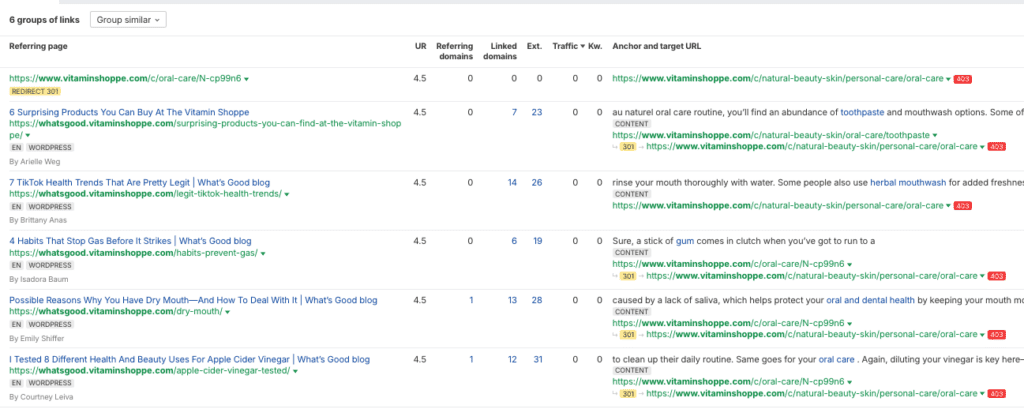
Here’s how the Vitamin Shoppe does this to help its category page rank for competitor search terms. They created blogs on the left around oral healthcare to link to their category page that sells oral health products:
Link Between Category and Subcategory Pages
Your broad category pages should link to their subcategories, and where it makes sense, subcategory pages should link to related subcategories. This creates the pyramid structure that Google uses to understand your site’s topical authority.
Of course, your CMS probably does this automatically from the filtering options. (Pic here)
However, I’d still take it a step further and link to some of your subcategory pages in the content under your product grid with optimized anchor text.
Link From High-Performing Product Pages to Relevant Category Pages
You don’t want to give a customer who’s ready to buy a reason to navigate away from your product page.
But a carefully placed link — at the bottom of the page, or in a “Browse more” section — can pass meaningful authority. Tag these links and monitor whether they’re actually getting clicked, and whether clicks correlate with lost conversions. If they do, remove them.
6. Consider Where Category Pages Live in Your Navigation Bar
Every link in your site’s main navigation bar appears on every page of your website. That means your navigation links receive a massive amount of internal link equity — arguably more than any other links on your site.
How you allocate that equity matters a lot.
If your navigation includes links to 80 different category and subcategory pages, you’re essentially telling Google “all of these pages are equally important and you need to crawl each of them every time you crawl a page with the navigation bar on it” – which, again, would be every single page.
That means your highest-priority category pages — the ones competing against strong rivals for high-volume keywords — are receiving the same internal authority boost as subcategory pages that face almost no competition at all.
So, be selective.
Feature your most competitive, highest-opportunity categories in the top-level navigation.
Pages that are easy to rank — niche subcategories with low competition — can live deeper in the site and still get found through subcategory links, blog posts, and faceted navigation. They don’t need the SEO boost that comes from a nav link on every page of your site.
Check for 301s
Check that every link in your menu points to the actual destination URL, not a URL that 301 redirects to the real page.
It sounds like a minor technical issue, but when the same redirecting link appears on every page of a 10,000-page site, that’s Google’s crawler wasting significant resources re-following the same unnecessary redirect over and over. Switch the navigation links to point directly to the final destination.
7. Use Canonical Tags Effectively
Most eCommerce category pages include filters that allow customers to sort products by attributes such as color, size, price range, material, or rating. While these filters improve usability and help shoppers find relevant products more quickly, they can create significant SEO challenges.
Every filter combination has the potential to generate a unique URL. On a large eCommerce site, a category page with multiple filter options can produce thousands—or even millions—of URL variations, many of which contain substantially similar content. Search engines may still attempt to crawl these pages, consuming crawl budget on URLs that provide little unique value and do not need to be indexed.
The right approach depends on the type of filtered page and whether it represents meaningful search demand:
- For filtered views that don’t warrant their own page (e.g., products sorted by price high-to-low, by customer rating, etc.), use a canonical tag pointing back to the main category page. This tells Google to consolidate any ranking signals to the primary URL rather than the filtered variant.
- For filtered views that do represent real search demand (e.g., “Black Trail Running Shoes” or “Waterproof Women’s Hiking Boots”), don’t just canonicalize them. Make them real subcategory pages with their own title tags, H1s, and canonical URLs. Let Google index them. Those are legitimate landing pages for searchers. This is what we were talking about in section 2 when I recommended going as granular as possible with your category pages.
- For paginated category pages, use self-referencing canonical tags on each paginated page. Google understands pagination and won’t penalize you for having multiple pages of the same category. A lot of companies make the mistake of adding canonical tags to each of their paginated pages that point back to the first in the series. Here’s another helpful video we’ve done on this topic.
8. Implement Structured Data
Structured data tells Google exactly what your category page contains, which increases the chance of enhanced search results that stand out in SERPs.
As a result, your category page will likely have a higher clickthrough rate. For category pages specifically, three schema types are worth implementing:
BreadcrumbList: Breadcrumbs reinforce your site hierarchy in Google’s index and can display as breadcrumb trails directly in search results. It helps users understand where the page sits in your navigation and can improve click-through rates. It’s such a simpl —yet extremely effective—site feature that going without it is unacceptable in 2026.
ItemList: This tells Google your page contains a list of products. Combined with the CollectionPage schema type, it signals that the primary purpose of the page is a product collection, not an article or a blog post. This disambiguation matters.
Product schema on featured items: If your category page prominently features specific products (bestsellers, new arrivals, sale items), Product schema on those individual listings can pull review stars and price information into search results.
One important note: don’t add AggregateRating schema to the category page itself.
Google’s structured data guidelines explicitly say not to apply review markup when the page is a category listing rather than a specific product. Getting this wrong doesn’t just fail to help — it can trigger a manual penalty.
9. Optimize How Your Products Appear on the Page
The product listings inside your category pages are what users actually interact with.
If those listings don’t give customers enough information to feel confident about clicking through, your bounce rate climbs, Google notices, and, of course, your conversions will suffer.
Here are some easy tips to avoid those consequences:
A High-Quality Product Image
Product images are often the first element shoppers evaluate before deciding whether to engage with a listing. Blurry, low-resolution, inconsistent, or missing images can undermine trust before a customer even reads the product title.
Consistency matters as well. Using a standardized image format—including the same background, angle, and scale—creates a cleaner category grid and makes products easier to compare at a glance.
Where possible, consider displaying multiple product images directly within the category page. Retailers like TaylorMade allow users to preview alternate product images by hovering over a listing, providing additional context without requiring a click-through.
An Accurate, Descriptive Product Title
Product titles should clearly communicate what the item is and highlight the attributes most important to shoppers.
Avoid relying solely on internal product names or SKUs. Instead, use terminology customers recognize and front-load key details whenever possible. For example, “Men’s Waterproof Trail Running Shoes” communicates significantly more information than “Trail Shoe M WP 2.0.”
Dick’s Sporting Goods provides several strong examples of descriptive product titles that quickly communicate product type and key features within category listings.
Star Ratings and Review Count
Displaying ratings and review counts directly within category pages provides immediate social proof and helps customers evaluate products without additional clicks.
A product with 4.7 stars and hundreds of reviews signals credibility before a shopper ever reaches the product page. Making this information visible at the category level can improve engagement and help users make faster purchase decisions.
Price — and Sale Pricing When It Applies
Pricing should be clearly visible within category listings, including both the original and discounted price when a product is on sale.
Prominent sale pricing helps products stand out within the category grid and can encourage additional clicks. If an entire category is discounted, consider using promotional messaging or banners to make that offer immediately visible.
Availability and Shipping Signals
Availability and shipping information can play a significant role in purchase decisions, particularly for shoppers with specific delivery expectations.
Badges such as “In Stock,” “Ships in 2 Days,” or “Free Shipping” provide useful context and reduce friction during the shopping experience.
Variant Previews Where Relevant
For products available in multiple colors, finishes, or variations, previewing those options directly within the category page can improve usability and reduce unnecessary clicks.
Simple visual indicators, such as color swatches, help shoppers quickly determine whether a product is available in their preferred variation before visiting the product page.
Standardizing these elements across category pages creates a more consistent shopping experience. Inconsistent listings—some with reviews, some without; some with complete imagery, others with placeholders—can create friction for users and reduce trust throughout the buying journey.
An “Add to Cart” button on each listing
If a customer already knows what they want, requiring them to visit a product page before adding an item to their cart can introduce unnecessary friction.
Every additional step between product discovery and checkout creates another opportunity for shoppers to abandon the purchase. That’s why many eCommerce retailers now surface “Add to Cart” or “Quick Add” functionality directly within category page listings, allowing ready-to-buy customers to move straight to checkout without an extra click.
As shown in the example below, some retailers make this functionality highly visible with a dedicated “Quick Add” button, while others use a more compact icon-based approach. Both methods help reduce friction and create a faster path to purchase.
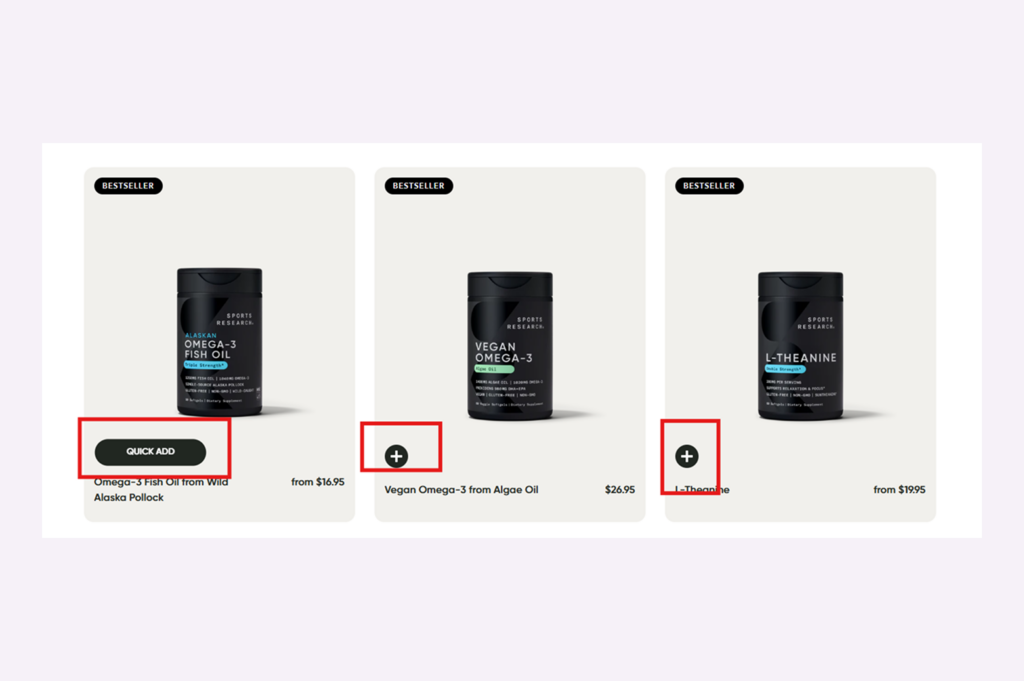
This approach is particularly effective for products where customers already know what they want and require little additional evaluation, such as supplements, consumables, replenishment purchases, or frequently purchased products.
When appropriate for the product category, reducing the number of steps between discovery and checkout can improve both user experience and conversion performance.
Treat Category Pages as Your Top Priority in 2026
Category pages are often the most valuable organic assets on an eCommerce website. They target high-intent, transactional searches, connect customers directly to products, and can drive qualified traffic at a scale that product pages and blog content rarely match.
Yet despite their importance, category pages remain one of the most under-optimized areas of many eCommerce SEO strategies.
The good news is that many of the highest-impact improvements are relatively straightforward to implement. Optimizing title tags, improving category page content, strengthening internal linking, refining navigation, and creating more targeted subcategory pages can all contribute to stronger organic visibility and a better user experience.
As search engines continue to prioritize relevance, site architecture, and user intent, category pages will remain a critical component of sustainable eCommerce growth. Brands that invest in these pages today will be better positioned to capture qualified traffic, support conversions, and compete more effectively in organic search.
If you’re looking to improve category page performance, uncover new organic growth opportunities, or build a scalable eCommerce SEO strategy, the Go Fish Digital team can help evaluate your current approach and identify the highest-impact opportunities.

About Kalina MacKay
Kalina MacKay oversees owned media at Go Fish Digital, including the digital PR, SEO, email marketing, and ORM teams. With natural passion, Kalina has a track record of creating innovative, newsworthy content that creates massive buzz and drives record results. She has produced and pitched campaigns that have been featured in the Washington Post, Forbes, Business Insider, Cosmopolitan, and countless other reputable outlets.