



JavaScript Rendering & LLM Visibility: Answers AI Can’t See

Published: September 11, 2026
Share on LinkedIn Share on Twitter Share on Facebook Click to print Click to copy url
Summarize with ChatGPT

A pricing page ranks on page one, pulls steady organic traffic, and passes every technical check you run. It also never appears in an AI answer about the category it sells into.
One possible reason: the answer isn’t in the HTML.
Many AI crawlers don’t execute JavaScript when they fetch a page. They receive the initial HTML response from the server, but content that only appears after JavaScript runs may never make it into what they can read.
That’s easy to miss because Google can render JavaScript. Your users obviously can too. So the page looks fine in a browser, ranks in search, and reports traffic normally in your analytics.
The problem usually isn’t that the entire page disappears. It’s that certain parts do. Pricing, product specs, comparison tables, reviews, FAQs, and location information are exactly the kinds of components that tend to pull from APIs or render client-side.
They’re also the answers buyers ask AI assistants for.
Here’s how to find out which answers your site is actually sending.
What JavaScript Rendering Changes About What a Machine Sees
There are two versions of a webpage worth separating.
- The first is the HTML your server sends when someone requests the URL.
- The second is the DOM a browser builds after downloading the page, executing its scripts, and adding or changing content.
A human usually sees the second version. A crawler that doesn’t execute JavaScript gets the first.
Three rendering patterns show up most often:
- Client-side rendering (CSR) relies on JavaScript in the browser to generate or populate some of the page.
- Server-side rendering (SSR) generates the content on the server and includes it in the HTML response.
- Static generation creates the finished HTML ahead of time.
This isn’t specifically a React issue. Any framework can ship content in different ways, and most large sites use a mix.
The question that matters is simpler: Is the information you want a machine to understand already there when the server sends the HTML?
Example #1: Website of Page Before Javascript Rendering
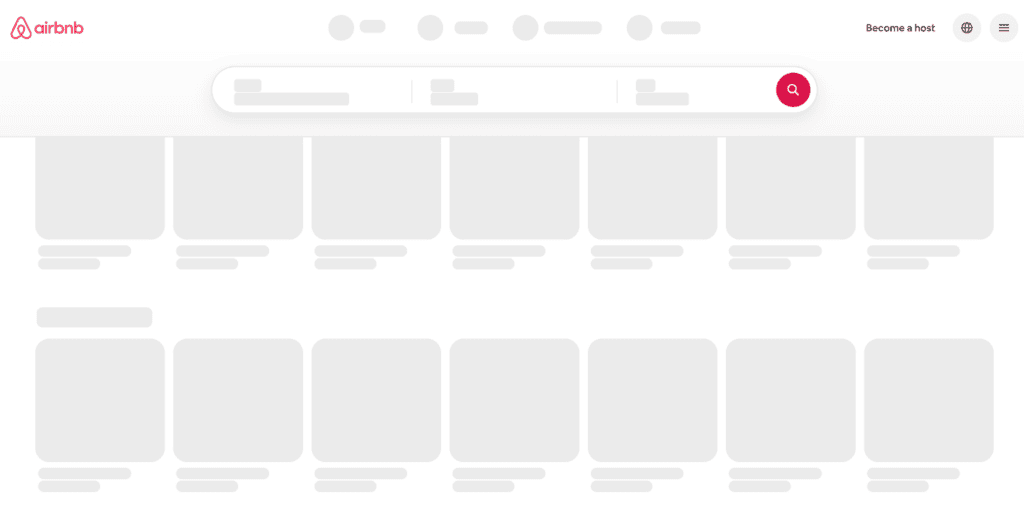
Example #1: Website of Same Page After Javascript Rendering

Example #2: Website of Page Before Javascript Rendering

Example #2: Website of Same Page After Javascript Rendering

Which AI Crawlers Can Render JavaScript?
Google can.
Google documents its JavaScript processing in three stages: crawling, rendering, and indexing. A page enters a rendering queue, where Google’s web rendering service can execute JavaScript before the rendered HTML is processed for indexing.
That isn’t how every AI crawler works.
Vercel and MERJ analyzed AI crawler behavior across the Vercel network, Next.js, and sites running other technology stacks. Their testing found that GPTBot, OAI-SearchBot, ChatGPT-User, ClaudeBot, Meta-ExternalAgent, Bytespider, and PerplexityBot did not render JavaScript.
Google’s Gemini is different because it uses Googlebot infrastructure. Applebot also rendered JavaScript in the Vercel/MERJ testing.
There is an interesting detail in the data. ChatGPT-related crawlers fetched JavaScript files in 11.5% of requests and Claude did so in 23.84%.
They downloaded the files. They didn’t execute them.
So a crawler can collect your JavaScript as text and still never build the page your customers see.
There’s another reason not to think of this as a simple “ChatGPT crawler” problem. AI companies operate multiple crawlers for different purposes. The safest implementation is one that doesn’t depend on a particular crawler executing JavaScript correctly.
The Real Failure Is Partial, and It Lands on Your Money Pages
Whole-site invisibility is easy to notice.
Partial invisibility isn’t.
Most sites don’t client-render everything. Static marketing copy and editorial content may already be in the server response, while components connected to databases, APIs, and third-party tools get added later.
That’s where this gets expensive.
Common examples include:
- Pricing loaded from an API after the page loads.
- Product specifications and comparison grids built client-side.
- Review counts and star ratings injected by a third-party widget.
- FAQ answers added to the DOM when an accordion opens.
- Product information stored behind tabs.
- Infinite-scroll listings without paginated HTML alternatives.
- Store, dealer, and location finders that require interaction before returning results.
Now look at those elements as answers instead of website components.
- What does it cost?
- How does it compare?
- Is it any good?
- Does it have this feature?
- Can I get it near me?
Those are buying questions.
The blog post explaining how to maintain the product may be perfectly readable to an AI crawler. The specifications and pricing that could get the product recommended may not be.
For eCommerce sites in particular, this is why JavaScript rendering needs to be considered alongside broader eCommerce SEO work around product grids, faceted navigation, internal linking, and crawlability.
Why Google Can Forgive This and LLM Crawlers May Not
Google gives JavaScript content another chance.
After the initial crawl, Google can put the page into its rendering queue and execute the JavaScript. Google notes that rendering can happen within seconds, but it can also take longer.
You can’t assume an AI crawler will do the same thing.
If the information wasn’t in the response it received, it may not have the information.
The distinction gets more important when you consider why AI crawlers are requesting content in the first place. AI crawling can support training, search retrieval, agents, and other functions. Cloudflare has started separating those categories in its own AI crawler reporting and controls.
That means a missing answer isn’t always just a missed live retrieval.
If a system is collecting information for a corpus and your product details aren’t available in the HTML it receives, you’ve lost an opportunity for that information to be collected from your site in the first place.
Retrieval may fill that gap later. It also may not.
This is one of the reasons LLM SEO can’t be treated as a layer that sits separately from technical SEO. The machine still has to get the information before it can do anything useful with it.
It’s also an example of why GEO depends on SEO. Many of the technical foundations that make content accessible to search engines also determine whether AI systems can access and interpret it.
Client-Side Rendering Exists for Good Reasons
None of this means client-side rendering is bad.
It pushes work to the user’s device, can reduce server requirements, and makes interactive states easier to manage. Modern component frameworks also made it a very normal way to build websites.
“Stop using React” isn’t a useful recommendation.
A better question is: Which components need to exist in the initial HTML, and which are actually post-load enhancements?
That can become an engineering ticket.
What Needs to Be in the Raw HTML?
Start with anything that helps a crawler understand the page, discover another page, or answer a question someone might ask about your business.
Page-Level Signals
Titles and meta descriptions should be available without relying on client-side rendering whenever possible.
Canonicals deserve particular attention. Google recommends using HTML to specify canonical URLs. JavaScript can be used, but Google warns against changing a canonical to a different URL from the one specified in the original HTML.
Meta robots directives, hreflang, and other important page metadata should get the same review.
For a non-rendering crawler, the rule is straightforward. If the information isn’t in the response it receives, JavaScript isn’t going to add it later.
Content and Links
The H1, heading structure, primary body copy, and content answering important questions should be present in the HTML.
That includes content displayed through tabs and accordions.
You can still use JavaScript to control whether the content is expanded or visible. It doesn’t have to control whether the content exists.
Links also need to behave like links. Google recommends crawlable <a> elements with href attributes. A <div> with a JavaScript click handler isn’t a reliable discovery path.
For infinite scroll, provide crawlable paginated URLs so deeper inventory isn’t dependent on interaction.
Structured Data
Structured data is another place where Google’s capabilities can hide the problem.
Google can process JSON-LD generated with JavaScript in supported implementations. A crawler that doesn’t execute JavaScript won’t receive structured data generated only after the script runs.
If product, organization, review, or other structured data is important to how machines interpret the page, put it in the initial HTML when possible.
Analytics and Tracking
GA4 isn’t going to show you the whole picture here.
AI crawlers that don’t execute your analytics JavaScript won’t appear as normal visits in GA4. So the dashboard can look healthy while the crawler received a materially different version of the page.
Server logs and CDN bot reporting are where you can see those requests directly.
That measurement gap is part of why these problems survive for so long.
How to See What a Non-Rendering Crawler Sees
You can get a useful first pass on this without building a new reporting system.
Step 1: View Source, Not Inspect
This is the easiest mistake to make.
Chrome’s Elements panel shows the DOM after JavaScript has run. If you’re trying to find out what arrived from the server, that’s the wrong view.
Use View Page Source with Ctrl+U on Windows or Cmd+Option+U on Mac.
Then search for something specific.
Don’t search for your company name or the page H1. Look for the thing you’re worried about losing:
- A price.
- A specification.
- An FAQ answer.
- A review.
- A location.
- A comparison point.
If that text isn’t there, a crawler that doesn’t render JavaScript doesn’t get it from the initial HTML.
For the raw response, I prefer the Network tab. Reload the page, click the document request, and open the Response tab.
Step 2: Disable JavaScript
Open Chrome DevTools and:
- Press Ctrl+Shift+P or Cmd+Shift+P to open the command menu.
- Search for Disable JavaScript.
- Select it.
- Reload the page while DevTools is still open.
- Look at what’s left.
This isn’t a perfect simulation of every crawler. It is a fast way to spot components that depend entirely on JavaScript.
Step 3: Compare Two Crawls in Screaming Frog
This is where a spot check becomes an audit.
Under Configuration → Spider → Rendering, run your priority URLs in Text Only mode.
Then crawl the same URL set with JavaScript rendering enabled.
Before you start, enable Store HTML and Store Rendered HTML. Screaming Frog will then let you compare the original and rendered HTML.
Look for differences in:
- Word count.
- H1s.
- Titles.
- Indexability.
- Internal links.
- Important page copy.
The difference between the two crawls is your starting gap list.
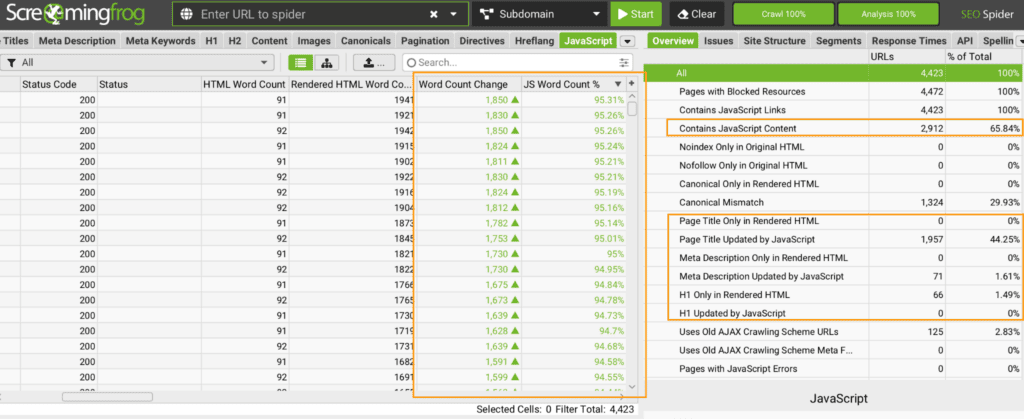
Screaming Frog’s JavaScript reporting can also surface pages where content appears only in rendered HTML, along with blocked resources and rendered screenshots.
We’ve covered other ways to extend Screaming Frog for technical analysis in our guide to using Screaming Frog custom JavaScript.
Step 4: Check Google’s Version in Search Console
Now run the same URL through Search Console’s URL Inspection tool.
Select Test Live URL, then inspect the tested HTML and screenshot.
That tells you what Googlebot can render.
Don’t use this instead of checking the raw response. Use them together.
If Google sees the content and the raw HTML doesn’t contain it, you’ve found exactly the kind of gap we’re looking for.
Step 5: Fetch the Page Without a Browser
A basic curl request against a URL on your own site returns the HTML response without a browser executing JavaScript.
It’s the quickest sanity check in the audit.
The browser shows you what the user eventually gets.
The response shows you what the server actually sent.
The Answer Unit Audit
Most technical audits are organized around pages.
For this problem, I think that’s the wrong unit.
A page can pass almost every technical check and still hide the one piece of information an AI system needs to answer a buying question.
So instead of auditing pages, audit answer units.
An answer unit is the specific piece of content on your site that answers a question you want your brand to be surfaced for.
How to Run an Answer Unit Audit
1. Write down 15 to 25 questions you want to be cited for.
Use real buyer language, not a keyword export.
For example:
- How much does [product] cost?
- What’s the difference between [product A] and [product B]?
- Is [product] good for [use case]?
- Does [product] include [feature]?
- Where can I buy [product]?
2. Find the element that answers each question.
- Don’t map the question to a page.
- Map it to the actual content that contains the answer.
- One question. One answer unit.
3. Check the raw HTML.
- Does that answer exist before JavaScript runs?
4. Score it.
Use three categories:
- Present: The full answer exists in the initial HTML.
- Partial: Some of the answer exists, but JavaScript is needed to get the rest.
- Missing: The answer only appears after JavaScript runs.
5. Prioritize by commercial intent.
Fix the answers that influence buying decisions first.
Pricing, specifications, comparisons, reviews, and availability generally matter more than whether every article in a five-year-old blog archive renders perfectly.
A site can pass 98% of a technical audit and fail the Answer Unit Audit on every high-intent question.
Both results can be accurate. They’re measuring different things.
JavaScript and LLM Visibility Fix List
Once you’ve found the gaps, prioritize the fixes:
- Server-render or statically generate content that answers buying questions.
- Ship tab and accordion content in the initial HTML. Use JavaScript to control visibility, not existence.
- Put titles, meta descriptions, canonicals, and important JSON-LD in the server response.
- Provide crawlable pagination behind infinite scroll.
- Use actual anchor tags with href attributes for navigation and internal links.
- Check your CDN and bot-management settings. A crawler blocked at the edge never gets far enough for rendering to matter.
- Review server logs or CDN reporting for AI crawler activity. GA4 isn’t enough for this.
- Repeat the text-only versus rendered comparison after major development releases.
These fixes also belong in the broader technical health of the site. Our guide to technical SEO wins covers other technical changes that can improve crawlability, indexation, and organic performance.
Bot management deserves more attention in 2026. Cloudflare has introduced separate controls for AI Search, AI Training, and AI user-action crawlers, giving site owners more control over which types of automated systems can access their content.
Rendering is only half the question if the crawler can’t access the URL at all.
Your Site Can Rank and Still Hide Its Best Answers
This is why I wouldn’t use Google rankings as proof that a site is ready for AI search.
Google can render the page. Your customer can render the page. Neither tells you what another crawler received from the server.
Check the raw HTML.
More importantly, check the raw HTML for the answers that actually matter.
Your maintenance guide isn’t the page I’m most worried about.
Your price, specifications, comparisons, reviews, and availability are.
If those answers require JavaScript to exist, they’re the first place I’d look when a brand ranks well in traditional search but consistently disappears from AI answers.
Request a Technical Audit
If you want to know which commercially important answers AI crawlers can actually access on your site, request a technical SEO audit from Go Fish Digital. We’ll look at what your pages send, what they render, and where the two versions create visibility gaps.
