


AI Conversion Rate Optimization Integrated Marketing Strategy seo site migration
How to Use Technology to Take the Fear Out of Site Migrations

Published: October 06, 2025
Share on LinkedIn Share on Twitter Share on Facebook Click to print Click to copy url

Few things make even seasoned SEOs lose sleep like a site migration. Whether it is a redesign, platform switch, full domain change, or all of the above, the risk of losing rankings, traffic, and conversions is always looming. Migration checklists can help, but they rarely address the real stress points: the volume of work and the unpredictability and instant measurability of results.
The good news is that we now have access to AI, automation, and smarter reporting tools that can take on some of the heavy lifting. Instead of manually mapping thousands of redirects or waiting weeks to see if rankings stabilize, you can lean on technology to catch issues earlier, reduce human error, and communicate results more clearly.
Here are five technology-driven tactics that can keep migrations SEO-friendly and much less intimidating.
Automated Pre-Migration Benchmarking
Before any changes are made, it is critical to know exactly how your site is performing. Having a detailed baseline makes it easier to diagnose problems after launch and demonstrate what went right when things improve.
With automation, you can create this “before” picture more efficiently:
- Run crawls with tools like Screaming Frog. They even provide a pre-migration checklist.
- Export traffic and ranking data. BigQuery Search Console exports work well for large-scale projects.
- Benchmark Core Web Vitals with PageSpeed Insights.
- Use AI to automatically capture screenshots of key page templates (then, compare them to your new design to flag potential conversion risks!)
When this process is automated, you avoid guesswork. Instead of debating whether a dip in conversions came from SEO or UX, you have the receipts.
We recommend archiving this baseline data in a shared dashboard or document that your entire team can access. That way, when stakeholders ask “Did traffic actually drop?” or “How did site speed change?” you are ready with data that answers those questions immediately.
Smarter Redirect Mapping with AI
Redirects are one of the most tedious and error-prone parts of a migration. Mapping thousands of legacy URLs to new destinations by hand not only drains resources but also leaves room for human error.
AI is now making this faster and more reliable. Using vector embeddings, you can match old URLs with semantically related new pages, reducing redirect chains and preventing orphaned content.
CASE IN POINT: When North Shore Commercial Door was migrating to Action Direct, we were able to quickly map 15,000+ URLs to their best new destination, even when the URL naming convention was changing (and sometimes, dramatically!) One week out from the migration we were seeing clicks +16.1% and impressions +18.5%, with the main declines coming from old North Shore branded queries (which we were now capturing with paid ads.)
Resources like Daniel Emery’sAI-powered redirect mapping guide andGoogle Colab tool are great starting points.
AI-assisted mapping ensures that link equity flows properly and nothing important gets left behind.
And remember, redirects are not just about SEO rankings. They affect user trust. If someone clicks on a bookmarked URL and lands on a 404, the experience can erode confidence in your brand. Technology-driven mapping minimizes that risk, preserving both traffic and credibility.
Content Consolidation Without Losing Relevance
Migrations often involve consolidating content. The risk is that in cleaning up duplicate or overlapping pages, you lose topical authority.
By using embeddings and natural language processing (NLP) tools, you can compare old and new content for semantic similarity. This helps confirm that key topics and keywords are preserved. For businesses with long-tail content or multiple service/product pages, this step is essential.
For example, think about a SaaS company with dozens of “how-to” blogs on similar topics. During a redesign, leadership might want to merge them into a smaller set of evergreen resources. Without NLP checks, subtle but important topics could be dropped. By scanning both sets of content for semantic overlap, you can ensure that the consolidated pages still answer all the questions users are asking, and continue to rank for long-tail queries that drive leads
The goal is not just to consolidate pages, but to make sure the consolidated version covers as much or more ground than the legacy versions. Done well, consolidation strengthens topical authority instead of diluting it.
Safeguarding Structured Data at Scale
Structured data often gets overlooked in a migration. Yet schema markup is what powers rich results like FAQs, product listings, and reviews. Losing it means losing valuable SERP visibility.
To protect it:
- Validate schema with the Google Rich Results Test.
- Confirm not only that schema is present, but that the values being pulled are accurate.
- Automate checks across all templates using Screaming Frog so nothing slips through the cracks.
When structured data is safeguarded, you preserve the enhanced listings that help drive clicks and conversions.
We have seen brands maintain rich snippets for competitive queries even when competitors lost theirs after redesigns. The difference? Schema validation baked into the migration plan. Protecting structured data is like carrying over your SERP “real estate” when you move houses, ignore it, and you might come back to find someone else has taken your spot. Remember, even if your CMS has schema built in, it may be missing nuanced attributes specific to your site. Don’t rely on the general templates – build markup specific to your site.
Monitoring Pre- vs. Post-Launch in Looker Studio
After launch, real-time monitoring is critical. A well-built dashboard in Looker Studio makes it easy to track performance and communicate it clearly to stakeholders.
By blending Search Console data from both old and new domains, you can quickly identify which queries improved, declined, or remained stable. Visualization helps make performance shifts easy to understand for executives who want proof that rankings will stabilize.
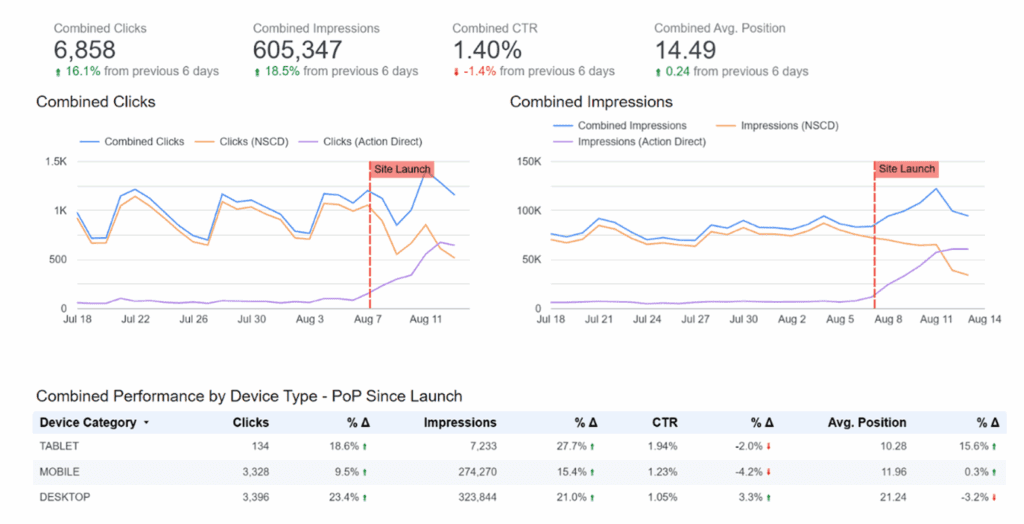
This level of reporting does not just help you act quickly, it builds trust during a stressful process. Clients and stakeholders can see, in real time, that the migration is under control.
We often recommend including side-by-side charts: one for traffic, one for conversions. This makes it clear that SEO recovery is not just about impressions or clicks, but also about revenue. The more you can tie reporting back to business outcomes, the easier it is to get buy-in for future migrations.
FAQs About Site Migrations and SEO
What is the biggest SEO risk during a site migration?
Losing traffic due to poorly mapped redirects or missing structured data is the most common risk. Planning ahead and using technology reduces these issues.
Can AI really help with site migrations?
Yes. AI is especially effective for redirect mapping and content consolidation. It speeds up processes that would otherwise take weeks and reduces the likelihood of errors.
How long does it take for SEO to recover after a migration?
It depends on the size of the site and the quality of the migration. With proper planning and monitoring, stabilization often happens within a few weeks to a few months.
Should I run a migration without external benchmarks?
No. Benchmarking before the migration is essential. Without it, you cannot prove success or accurately identify problems.
A website migration will never be entirely stress-free, but it does not have to feel like jumping off a cliff. By layering in technology at every stage, you can turn what used to be guesswork into a more controlled, data-driven process. Automated benchmarks give you a clear before-and-after picture, AI streamlines redirect mapping, embeddings safeguard topical authority, structured data checks preserve rich results, and dashboards make it simple to monitor changes in real time.
Most importantly, these tools help you demonstrate value. Instead of saying “we survived the migration,” you can show stakeholders that traffic stabilized, conversions held, and long-term growth opportunities were unlocked. That is the difference between simply finishing a project and turning it into a win for the business.
The end result is not just a survivable migration, but one that sets you up for long-term growth. The brands that win migrations do more than protect rankings. They use the process to come out stronger: with cleaner architecture, preserved authority, and proof of performance.
CTA: Ready to plan a website migration with less stress? Get in touch with Go Fish Digital.