


Google Just Made a Major Move: AI Is Now Built Into Search Console

Published: December 11, 2025
Share on LinkedIn Share on Twitter Share on Facebook Click to print Click to copy url
Rarely, Google releases an update that don’t t just tweak the edges of SEO work, but fundamentally shifts how people interact with their own data. This is one of those moments. AI is now officially rolling out inside Search Console, and even though the interface still looks familiar, the way SEOs work inside it is about to feel very different.
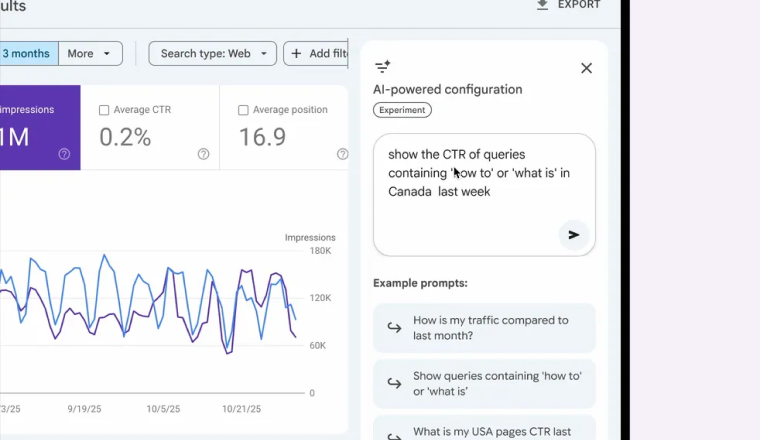
This update introduces new AI-powered features that let users filter data, adjust reports, run comparisons, and select metrics using simple prompts. Instead of clicking through layers of menus to create the view you want, Search Console now gives you a blue button inside the Performance reports that opens a right-hand sidebar. That sidebar is where the prompt interface lives. You type what you want, and the system reshapes the report based on your request.
It’s a big shift for a tool that, until now, has stayed mostly manual even as the rest of Google’s ecosystem has moved aggressively toward Gemini integration.
A New Way to Work With Performance Data
Until this rollout, the Performance report workflow was straightforward but repetitive. You clicked into filters for queries, pages, countries, devices, or dates. You built out insane Regex strings. You selected what you wanted. You repeated that process every time you needed a slightly different view.
Now the experience changes. The blue button becomes the access point for a prompt-based workflow. When you click it, the right-hand dialog gives you an input box where you can describe the type of data you’d like to see. Instead of searching for the exact filter path or clicking through dropdowns, you simply request the configuration.
The update allows SEOs to:
- Adjust filters, including queries, locations, and devices
- Customize date ranges
- Run comparisons
- Choose which metrics appear including clicks, impressions, CTR, or position
None of this is new functionality. What’s new is how you reach it. Prompting replaces a lot of the manual labor involved in setting up a view. It also gives SEOs the option to work faster, especially when switching between types of analysis or sharing insights with stakeholders who may not be deep in the tool every day.
Why This Matters for SEOs Who Live in Search Console
Search Console is, at its core, a platform that rewards precision. The insights are there, but they only surface when you filter, compare, and interrogate the data correctly. It’s one of the reasons SEO has always felt complex. Search Console gives you the truth, but the UI only tells part of the story. The rest comes from knowing how to extract the unsampled data.
The AI update doesn’t replace that skillset. Instead, it reshapes the workflow behind it. Prompting is a shortcut to the same destination SEOs already navigate manually. It lets people articulate their intent instead of scrolling through options. For example, you don’t have to click through the Devices or Countries filters separately, you can describe the combination you want.
The shift also matters for people who need to move quickly between views. If you’re analyzing both long-term trends and week-over-week comparisons, or if you frequently jump between mobile and desktop data, prompting trims a lot of time off the setup process. And because the system responds directly to what you describe, it reduces the friction involved in building custom views, something many SEOs do dozens of times during an audit, weekly report, or content analysis.
Prompts We’re Excited to Test First
If Google wants SEOs to think in prompts, we might as well start with the ones that actually solve real reporting problems. These are the first prompt ideas our team plans to test as soon as the feature rolls out:
1. Combine performance for URLs with and without a trailing slash
Great for catching performance splits caused by URL format changes or inconsistent linking patterns.
2. Compare nonbrand performance for /collection/ and /category/ pages before and after a migration
A quick way to see whether structural changes helped or hurt visibility.
3. Pull nonbrand blog performance year-over-year
Helpful for understanding whether content clusters are compounding or slipping.
4. Surface queries with more than five words
A fast way to find intent-rich long-tail opportunities, especially ones that may match AI-search behavior.
5. Show question-based queries (“how to…,” “what…” etc.)
Useful for identifying early-stage research patterns and content gaps.
The Sidebar Interface Signals a Bigger Transformation
The right-hand sidebar isn’t just a UI choice. It’s another sign that Google is standardizing how Gemini shows up across its tools. Even in places where AI already existed behind the scenes, the interface hasn’t always reflected that shift. Here, it’s unmistakable. Search Console now feels like part of a broader rollout designed to bring prompting to every corner of Google’s ecosystem.
That’s the larger story behind this update. This isn’t a test or a small experiment. This is Google folding Gemini into the tools SEOs rely on daily. And if it’s happening inside Search Console, a product that historically changes slowly and conservatively, it’s fair to assume the direction is clear: every surface Google controls is being prepared for Gemini.
This update doesn’t need additional features to make that point. The fact that prompting is now a built-in method of working with Performance data is the point.
A Meaningful Change Without Changing the Data Itself
It’s worth highlighting that Google hasn’t changed what data SEOs can access. Clicks are still clicks, impressions are still impressions, CTR is still CTR, and position is still position. The underlying dataset remains what it always has been.
What has changed is the process of reaching that dataset. Prompting sits on top of the existing functionality, which means the workload shifts even though the output stays familiar. That makes this update easier for teams to adopt because there’s no new metric to explain to leadership, no new report structure to interpret, and no learning curve around the data itself.
Instead, this update is about speed and accessibility. It turns Search Console into a tool where you can describe what you want instead of building it manually.
Want help making sense of this update?
If you want help sorting out what this change means for your site, or you want a clearer view into how your Search Console data is actually performing, reach out. We can walk through how to use these new AI features to surface the insights that matter most.
